
零基础人工智能-第二篇 TensorFlow2.0 手把手教程-玩转图像精准分类
2020-04-15

TF2.0与TF1.0区别
首先简单介绍下TF2.0与TF1.0区别。
数据集的切换
keras的接口成为了主力
datasets, layers, models都是从Keras引入的,而且在网络的搭建上,代码更少,更为简洁图形化界面更简便。
Fashion Mnist库,建立简单图像分类
pip install -i https://pypi.tuna.tsinghua.edu.cn/simple matplotlib
2. 新建项目
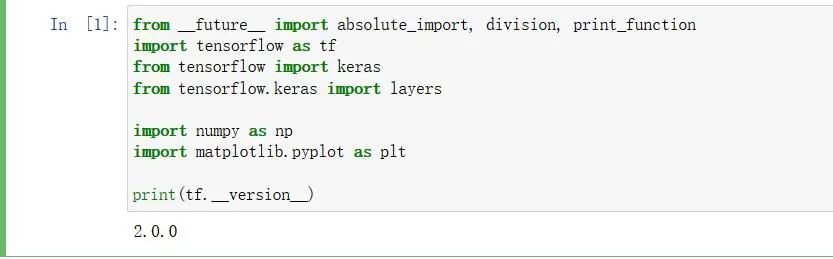
from __future__ import absolute_import, division, print_function

import tensorflow as tf

from tensorflow import keras

from tensorflow.keras import layers

import numpy as np

import matplotlib.pyplot as plt

print(tf.__version__)
3. 获取Fashion MNIST数据集

(train_images,train_labels),(test_images, test_labels) = keras.datasets.fashion_mnist.load_data()

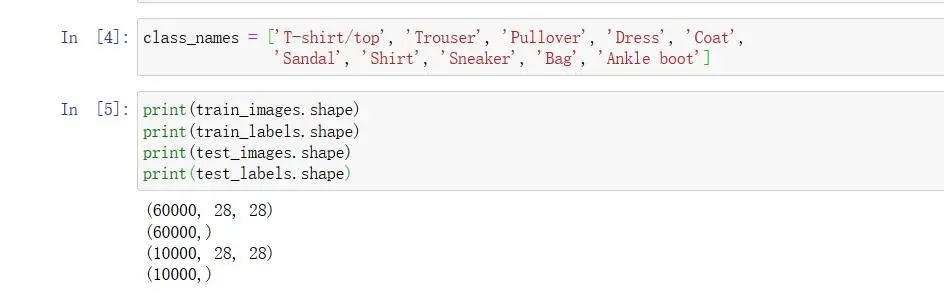
class_names = ['T-shirt/top', 'Trouser', 'Pullover', 'Dress', 'Coat',
'Sandal', 'Shirt', 'Sneaker', 'Bag', 'Ankle boot']
4. 探索数据
print(train_images.shape)

print(train_labels.shape)

print(test_images.shape)

print(test_labels.shape)
5. 处理数据
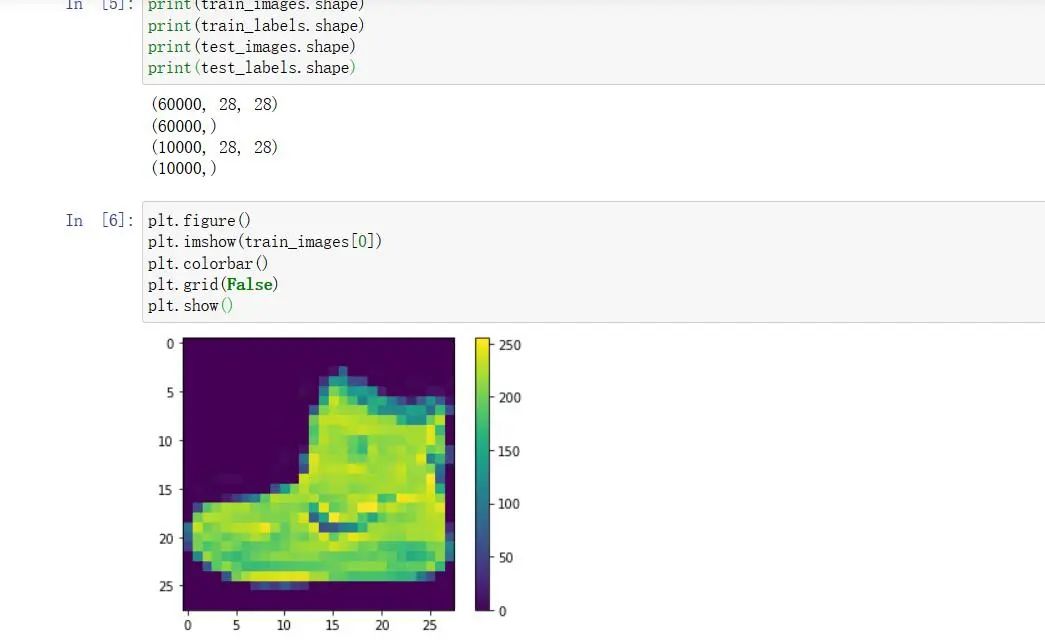
plt.figure()

plt.imshow(train_images[0])

plt.colorbar()

plt.grid(False) #

plt.show()
预处理和绘图 
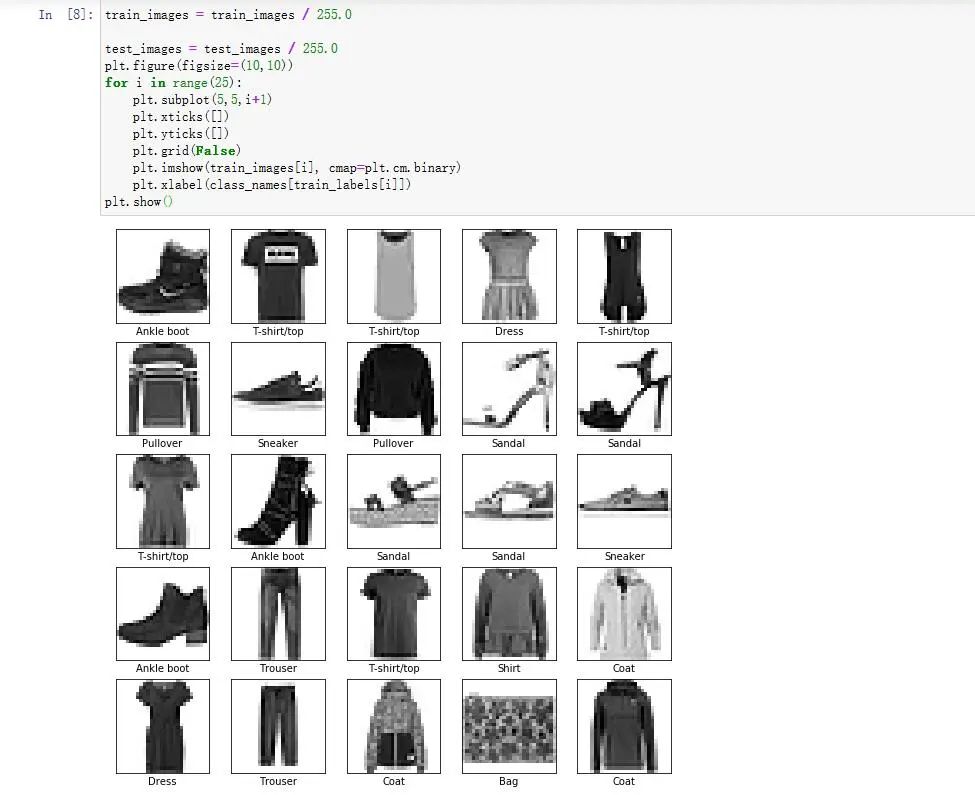
train_images = train_images / 255.0

test_images = test_images / 255.0

plt.figure(figsize=(10,10))

for i in range(25):

plt.subplot(5,5,i+1)

plt.xticks([])

plt.yticks([])

plt.grid(False)

plt.imshow(train_images[i], cmap=plt.cm.binary)

plt.xlabel(class_names[train_labels[i]])

plt.show()
6.构建网络
model = keras.Sequential(

[

layers.Flatten(input_shape=[28, 28]),

layers.Dense(128, activation='relu'),

layers.Dense(10, activation='softmax')

])

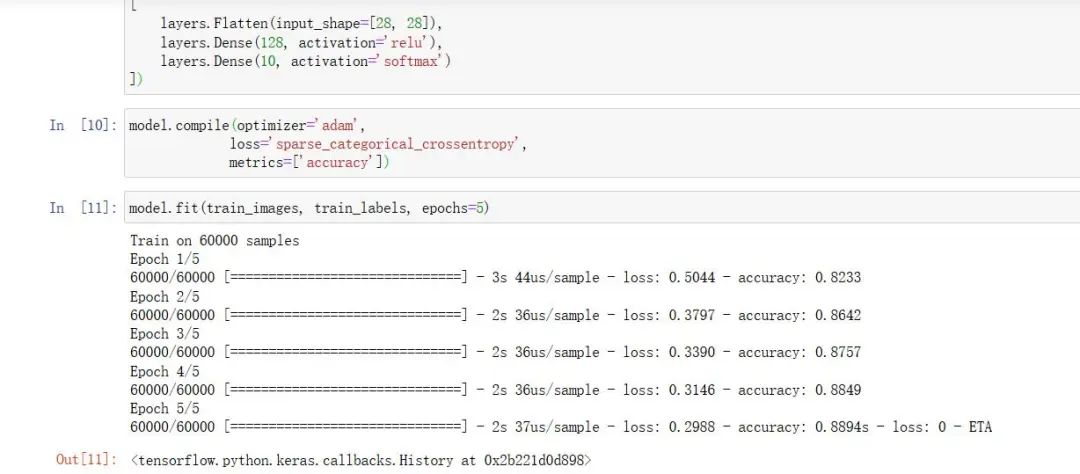
model.compile(optimizer='adam',

loss='sparse_categorical_crossentropy',

metrics=['accuracy'])
7. 训练与验证
model.fit(train_images, train_labels, epochs=5)
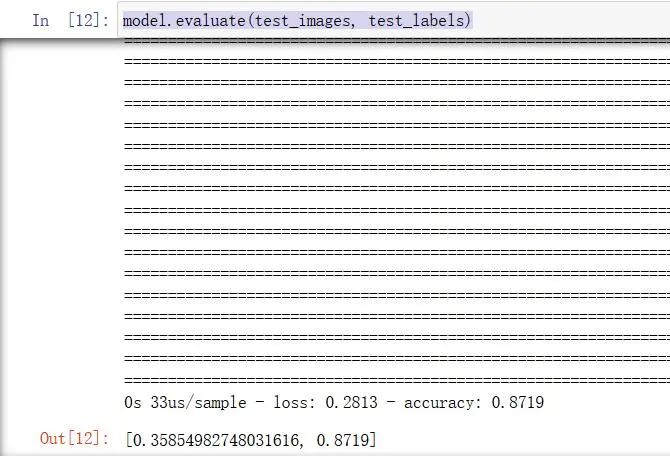
model.evaluate(test_images, test_labels)
8. 预测
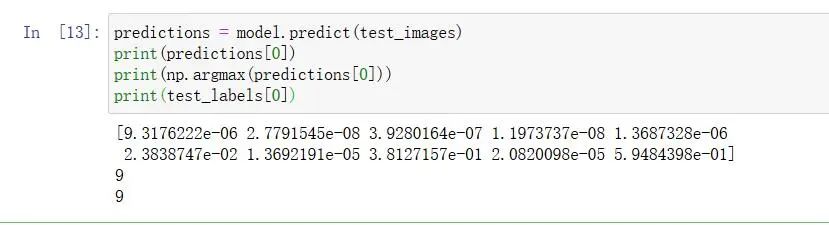
predictions = model.predict(test_images)

print(predictions[0])

print(np.argmax(predictions[0]))

print(test_labels[0])
9. 绘制预测图
def plot_image(i, predictions_array, true_label, img):

predictions_array, true_label, img = predictions_array[i], true_label[i], img[i]

plt.grid(False)

plt.xticks([])

plt.yticks([])

plt.imshow(img, cmap=plt.cm.binary)

predicted_label = np.argmax(predictions_array)

if predicted_label == true_label:

color = 'blue'

else:

color = 'red'

plt.xlabel("{} {:2.0f}% ({})".format(class_names[predicted_label],

100*np.max(predictions_array),

class_names[true_label]),

color=color)

def plot_value_array(i, predictions_array, true_label):

predictions_array, true_label = predictions_array[i], true_label[i]

plt.grid(False)

plt.xticks([])

plt.yticks([])

thisplot = plt.bar(range(10), predictions_array, color="#777777")

plt.ylim([0, 1])

predicted_label = np.argmax(predictions_array)

thisplot[predicted_label].set_color('red')

thisplot[true_label].set_color('blue')

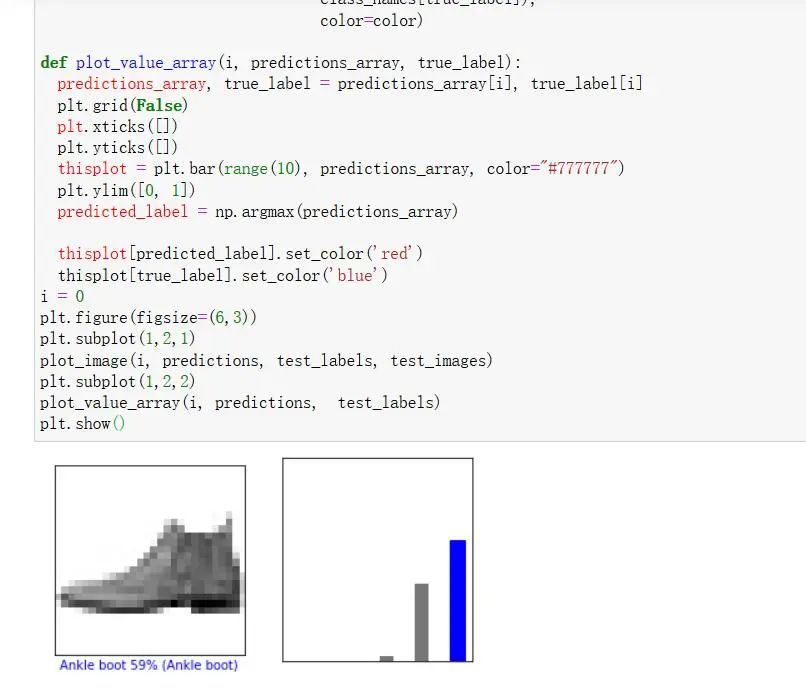
i = 0

plt.figure(figsize=(6,3))

plt.subplot(1,2,1)

plot_image(i, predictions, test_labels, test_images)

plt.subplot(1,2,2)

plot_value_array(i, predictions, test_labels)

plt.show()
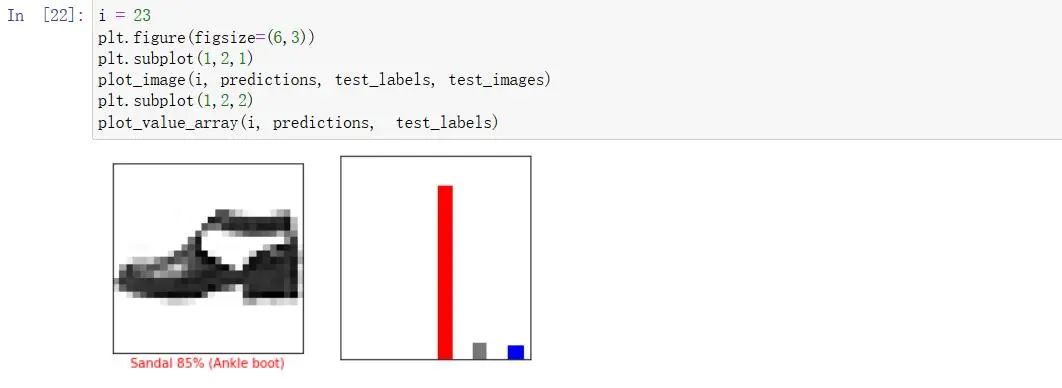
i = 21

plt.figure(figsize=(6,3))

plt.subplot(1,2,1)

plot_image(i, predictions, test_labels, test_images)

plt.subplot(1,2,2)

plot_value_array(i, predictions, test_labels)
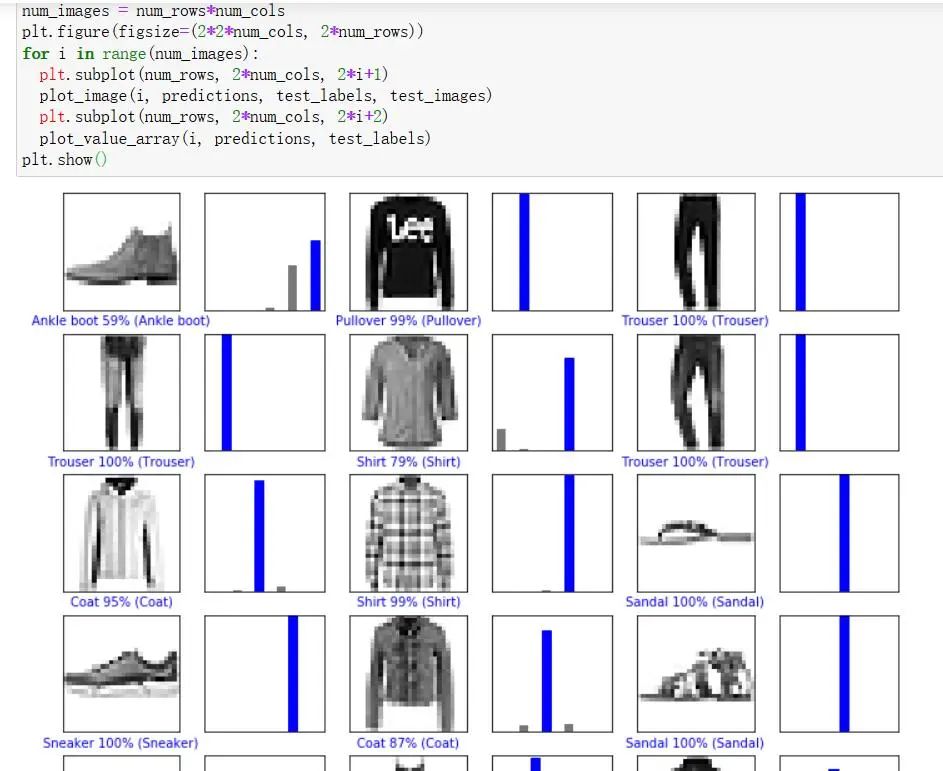
num_rows = 5

num_cols = 3

num_images = num_rows*num_cols

plt.figure(figsize=(2*2*num_cols, 2*num_rows))

for i in range(num_images):

plt.subplot(num_rows, 2*num_cols, 2*i+1)

plot_image(i, predictions, test_labels, test_images)

plt.subplot(num_rows, 2*num_cols, 2*i+2)

plot_value_array(i, predictions, test_labels)

plt.show()
绘制统计预测图
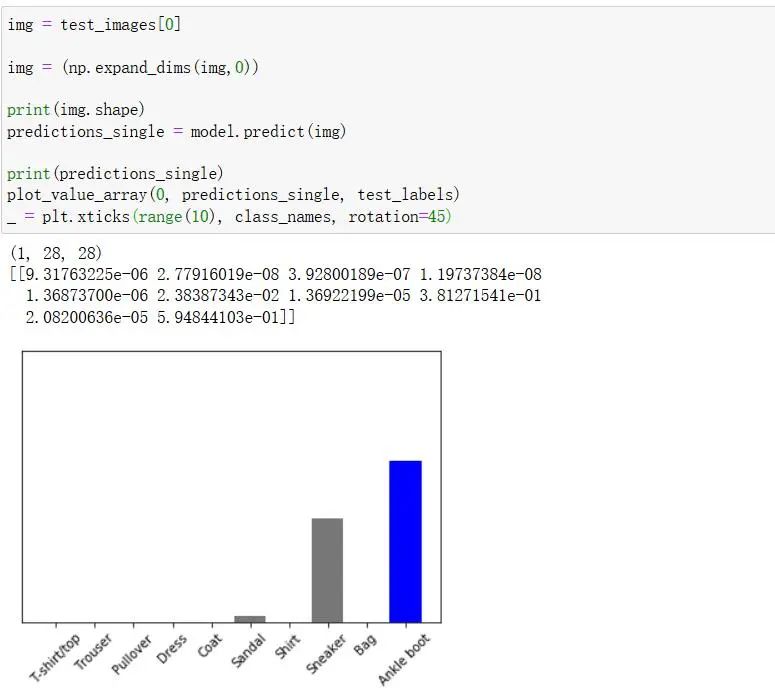
img = test_images[0]

img = (np.expand_dims(img,0))

print(img.shape)

predictions_single = model.predict(img)

print(predictions_single)

plot_value_array(0, predictions_single, test_labels)

_ = plt.xticks(range(10), class_names, rotation=45)
最新动态
警告!你有一份OpenClaw(龙虾) “抓虾”指南待查收!
OpenClaw(龙虾)智能体工具在企业办公场景的快速普及,带来了新的安全治理挑战。文章分析了OpenClaw的风险特征:具备外部联网、本地资源调用、自动化任务执行等能力,可能绕过企业安全边界。提供了终端安装检查、网络访问监控、行为审计等四维排查方法,并介绍了"风铃"系统的Agent行为检测能力。建议企业建立面向Agent类应用的长期治理机制,而非仅针对单一产品的应急处理。
2026-03-16
漠坦尼十周年庆典圆满礼成 | 拾光筑梦 · 同心致远
杭州漠坦尼科技庆祝成立十周年,举办"拾光筑梦·同心致远"主题庆典。活动回顾十年奋斗历程,总经理钱轶锋发布聚焦AI的未来战略。庆典包含员工表彰、趣味互动和幸运抽奖等环节,感谢全体员工和合作伙伴的支持,展望下一个十年的发展蓝图。
2026-03-09
欢度新春,安全守护不打烊 | 2026马年春节值守进行时
2026马年春节假期,漠坦尼安全团队将提供7X24小时不间断服务,确保客户业务安全无忧。现场和远程均有专人值守,值班工程师名单及联系方式已公布。公司春节假期为2月14日至24日,共11天,25日正式上班。专业团队随时待命,守护您的春节安全。
2026-02-13
荣耀回响:时间轴上的奋进之迹
《荣耀回响:时间轴上的奋进之迹》回顾了漠坦尼2025年在网络安全领域的突破与成就。从2月发布卫鸢AI自动值守系统,到12月完成openGauss兼容性认证,公司全年在技术创新、行业认证和生态共建方面取得多项重要成果,包括获得多项安全检测证书、入选信通院典型案例集、亮相互联网大会等。这些成绩展现了漠坦尼在AI与网络安全融合应用领域的实力,为2026年的新征程奠定了坚实基础。
2026-02-11
权威认证 | 漠坦尼风铃横向威胁感知系统荣获《网络安全专用产品安全检测证书》
漠坦尼风铃横向威胁感知系统近日获得中国电子科技集团公司第十五研究所颁发的《网络安全专用产品安全检测证书》。该系统专注内网横向威胁感知,通过自主研发技术实现无侵入部署,精准捕获攻击者渗透行为。漠坦尼成立于2016年,为多行业提供一体化网络安全解决方案。此次认证彰显了产品的安全性与可靠性。
2026-01-16